Documentation
Everything you need to know about FollowUpCall email addresses, recurring reminders, and integrations.
Quick Start
Send an email to any time-based address at followupcall.me and get a phone call and email reminder when it is due.
Send an email
To or BCC any time-based address
Task is scheduled
You get a confirmation email instantly
Get a phone call
Plus an email reminder in the same thread
Time Intervals
Use these addresses to get a reminder after a specific amount of time.
Minutes
| Address | Reminder After |
|---|---|
| 1min@followupcall.me | 1 minute |
| 5min@followupcall.me | 5 minutes |
| 10min@followupcall.me | 10 minutes |
| 15min@followupcall.me | 15 minutes |
| 30min@followupcall.me | 30 minutes |
Hours
| Address | Reminder After |
|---|---|
| 1hour@followupcall.me | 1 hour |
| 2hours@followupcall.me | 2 hours |
| 3hours@followupcall.me | 3 hours |
| 4hours@followupcall.me | 4 hours |
| 5hours@followupcall.me | 5 hours |
| 6hours@followupcall.me | 6 hours |
| 8hours@followupcall.me | 8 hours |
| 12hours@followupcall.me | 12 hours |
Days
| Address | Reminder After |
|---|---|
| 1day@followupcall.me | 1 day |
| 2days@followupcall.me | 2 days |
| 3days@followupcall.me | 3 days |
| 7days@followupcall.me | 7 days |
Special Aliases
| Address | When |
|---|---|
| tomorrow@followupcall.me | Tomorrow at 9:00 AM |
| tonight@followupcall.me | Today at 6:00 PM |
| nextweek@followupcall.me | Next Monday at 9:00 AM |
| callme@followupcall.me | In 5 minutes (quick callback) |
| urgent@followupcall.me | In 10 minutes (high priority) |
Time of Day
Schedule a reminder for a specific time today (or tomorrow if that time has already passed).
| Address | Reminder At |
|---|---|
| 7am@followupcall.me | 7:00 AM |
| 8am@followupcall.me | 8:00 AM |
| 9am@followupcall.me | 9:00 AM |
| 10am@followupcall.me | 10:00 AM |
| 11am@followupcall.me | 11:00 AM |
| 12pm@followupcall.me | 12:00 PM |
| 1pm@followupcall.me | 1:00 PM |
| 2pm@followupcall.me | 2:00 PM |
| 3pm@followupcall.me | 3:00 PM |
| 4pm@followupcall.me | 4:00 PM |
| 5pm@followupcall.me | 5:00 PM |
| 6pm@followupcall.me | 6:00 PM |
| 7pm@followupcall.me | 7:00 PM |
| 8pm@followupcall.me | 8:00 PM |
| 9pm@followupcall.me | 9:00 PM |
| 10pm@followupcall.me | 10:00 PM |
Days of Week
Schedule a reminder for the next occurrence of a specific day at 9:00 AM.
| Address | Reminder On |
|---|---|
| monday@followupcall.me | Next Monday at 9:00 AM |
| tuesday@followupcall.me | Next Tuesday at 9:00 AM |
| wednesday@followupcall.me | Next Wednesday at 9:00 AM |
| thursday@followupcall.me | Next Thursday at 9:00 AM |
| friday@followupcall.me | Next Friday at 9:00 AM |
| saturday@followupcall.me | Next Saturday at 9:00 AM |
| sunday@followupcall.me | Next Sunday at 9:00 AM |
Recurring Reminders
Set up recurring schedules that automatically create reminder instances over time. Each instance triggers a phone call and email reminder just like a one-off task.
How Recurring Works
- 1.Sending an email to a recurring address creates a recurring schedule and generates 30 task instances upfront.
- 2.Each instance triggers a phone call and email reminder at the scheduled time.
- 3.Pressing 1 on a call completes that individual instance -- it does not cancel the entire series.
- 4.Cancel the full series via the dashboard or MCP integration.
- 5.Maximum of 30 instances at a time. New instances are auto-replenished as existing ones get completed.
Daily
| Address | Schedule |
|---|---|
| daily@followupcall.me | Every day at 9:00 AM |
| everyday@followupcall.me | Every day at 9:00 AM |
| weekdays@followupcall.me | Monday through Friday at 9:00 AM |
Weekly
| Address | Schedule |
|---|---|
| weekly@followupcall.me | Every week (same day you sent the email) |
| everymonday@followupcall.me | Every Monday at 9:00 AM |
| everytuesday@followupcall.me | Every Tuesday at 9:00 AM |
| everywednesday@followupcall.me | Every Wednesday at 9:00 AM |
| everythursday@followupcall.me | Every Thursday at 9:00 AM |
| everyfriday@followupcall.me | Every Friday at 9:00 AM |
| everysaturday@followupcall.me | Every Saturday at 9:00 AM |
| everysunday@followupcall.me | Every Sunday at 9:00 AM |
Bi-weekly, Monthly, Quarterly & Yearly
| Address | Schedule |
|---|---|
| biweekly@followupcall.me | Every 2 weeks |
| every2weeks@followupcall.me | Every 2 weeks |
| fortnightly@followupcall.me | Every 2 weeks |
| monthly@followupcall.me | Once a month (same date) |
| everymonth@followupcall.me | Once a month (same date) |
| quarterly@followupcall.me | Every 3 months |
| every3months@followupcall.me | Every 3 months |
| yearly@followupcall.me | Once a year (same date) |
| annually@followupcall.me | Once a year (same date) |
Custom Intervals
| Address | Schedule |
|---|---|
| every3days@followupcall.me | Every 3 days |
| every2weeks@followupcall.me | Every 2 weeks |
| every12hours@followupcall.me | Every 12 hours |
The pattern is every{N}{unit} where unit is hours, days, or weeks.
Day of Month
| Address | Schedule |
|---|---|
| every1st@followupcall.me | 1st of every month |
| every15th@followupcall.me | 15th of every month |
Use every{N}th or every{N}st for any day of the month (1st through 31st).
Interactive Actions
When you receive a reminder phone call, you can take action using your phone keypad.
Press 1 -- Done
Marks the current reminder as completed. For recurring reminders, this completes only the current instance -- the series continues on schedule.
Press 2 -- Snooze
Snoozes the reminder for 1 hour. You will receive another phone call and email when the snooze period ends.
MCP Integration
Create and manage reminders directly from Claude Code, Cursor, or any MCP-compatible client.
Claude Code
Add FollowUpCall as an MCP server:
claude mcp add --transport http followupcall https://api.followupcall.me/api/mcpA browser window opens for Google sign-in on first use.
Cursor
Add to Cursor Settings > MCP Servers:
{
  "followupcall": {
    "type": "http",
    "url": "https://api.followupcall.me/api/mcp"
  }
}
OAuth sign-in happens automatically on first use.
Available MCP Tools
Claude Desktop
Use FollowUpCall directly from the Claude Desktop app. Set up reminders in natural language -- just tell Claude what you need and when.
Open Settings > Connectors
In Claude Desktop, go to Settings and select the Connectors tab. Click "Add custom connector" at the bottom.
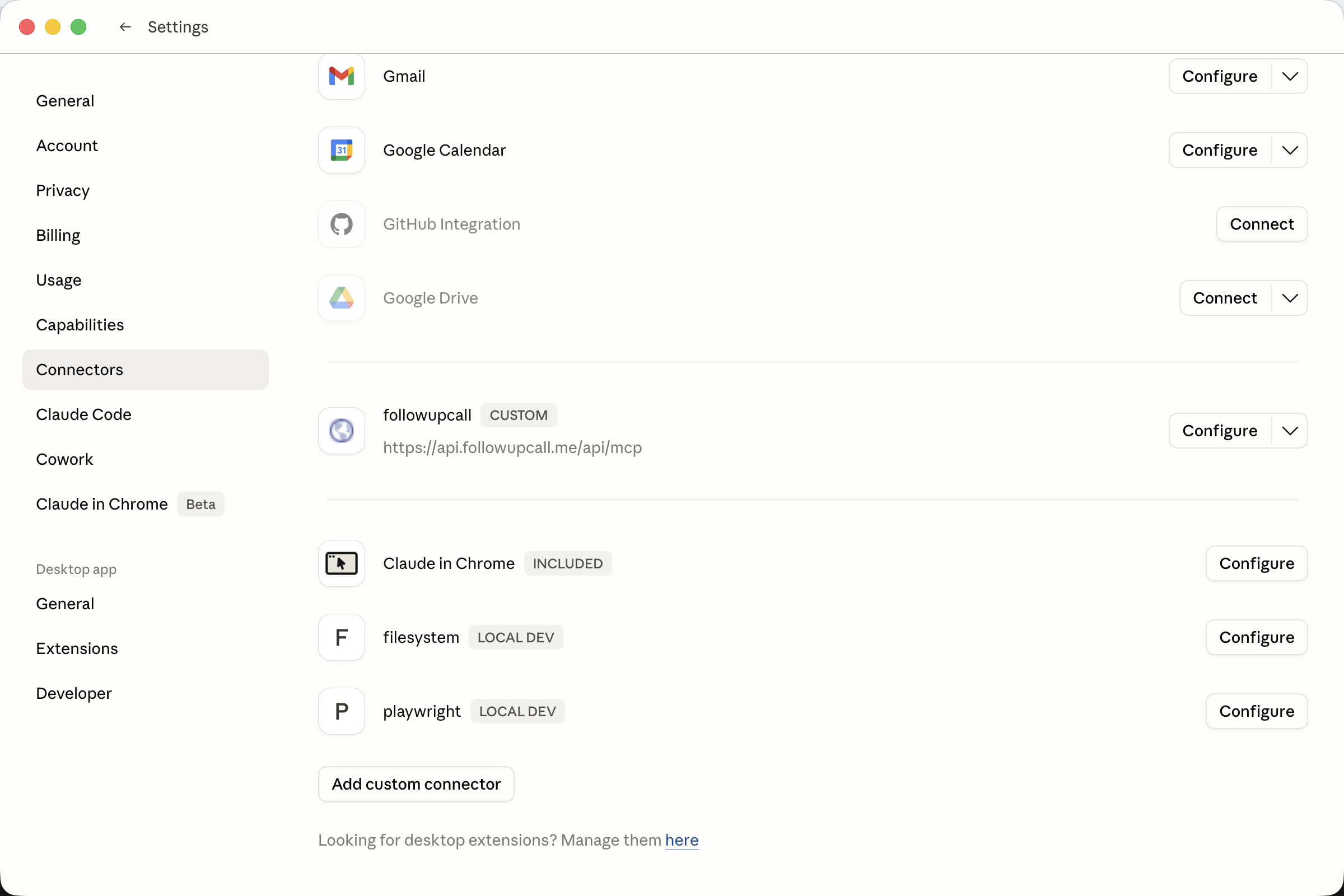
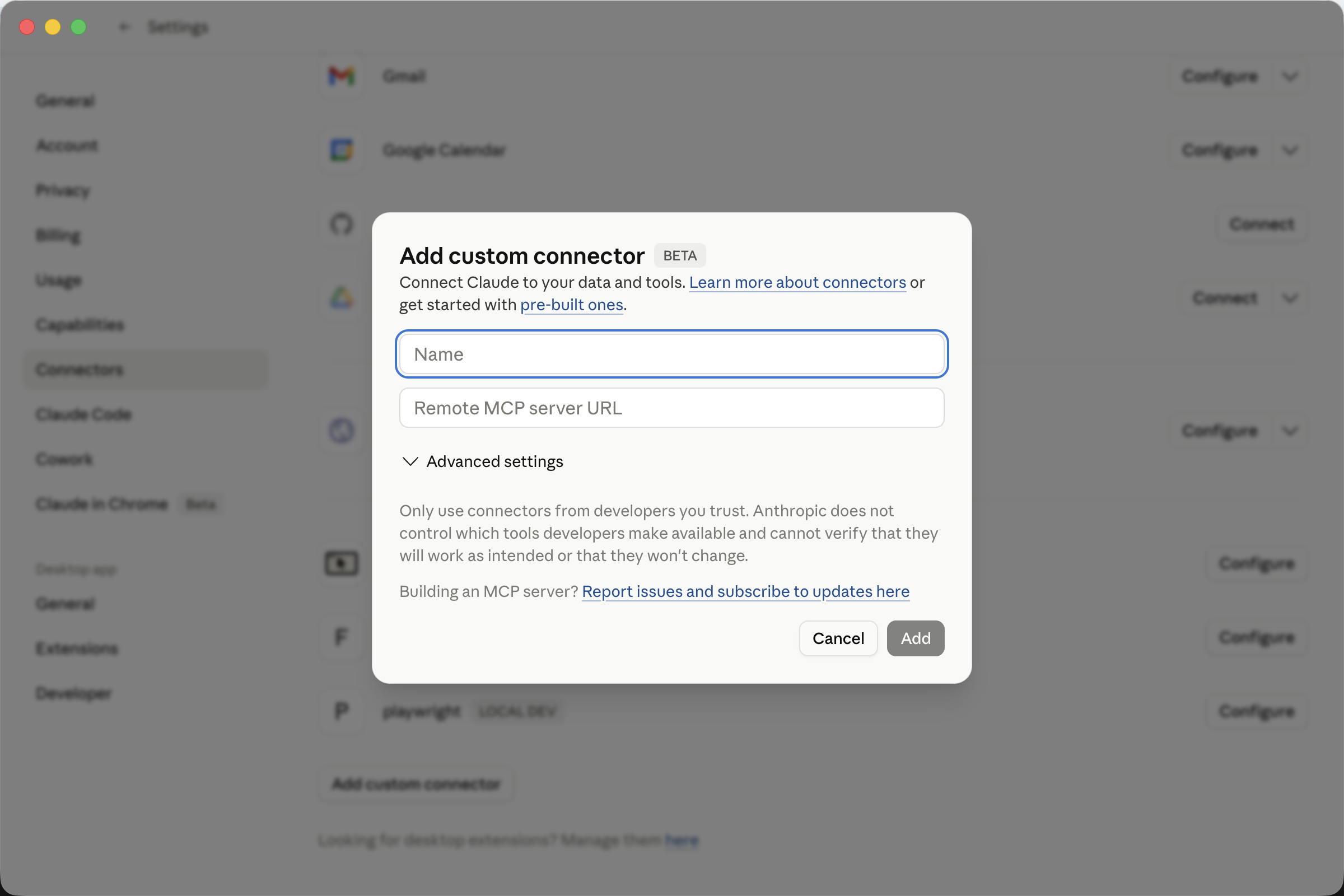
Add FollowUpCall connector
Enter the following details and click Add:
| Name | followupcall |
| Remote MCP server URL | https://api.followupcall.me/api/mcp |
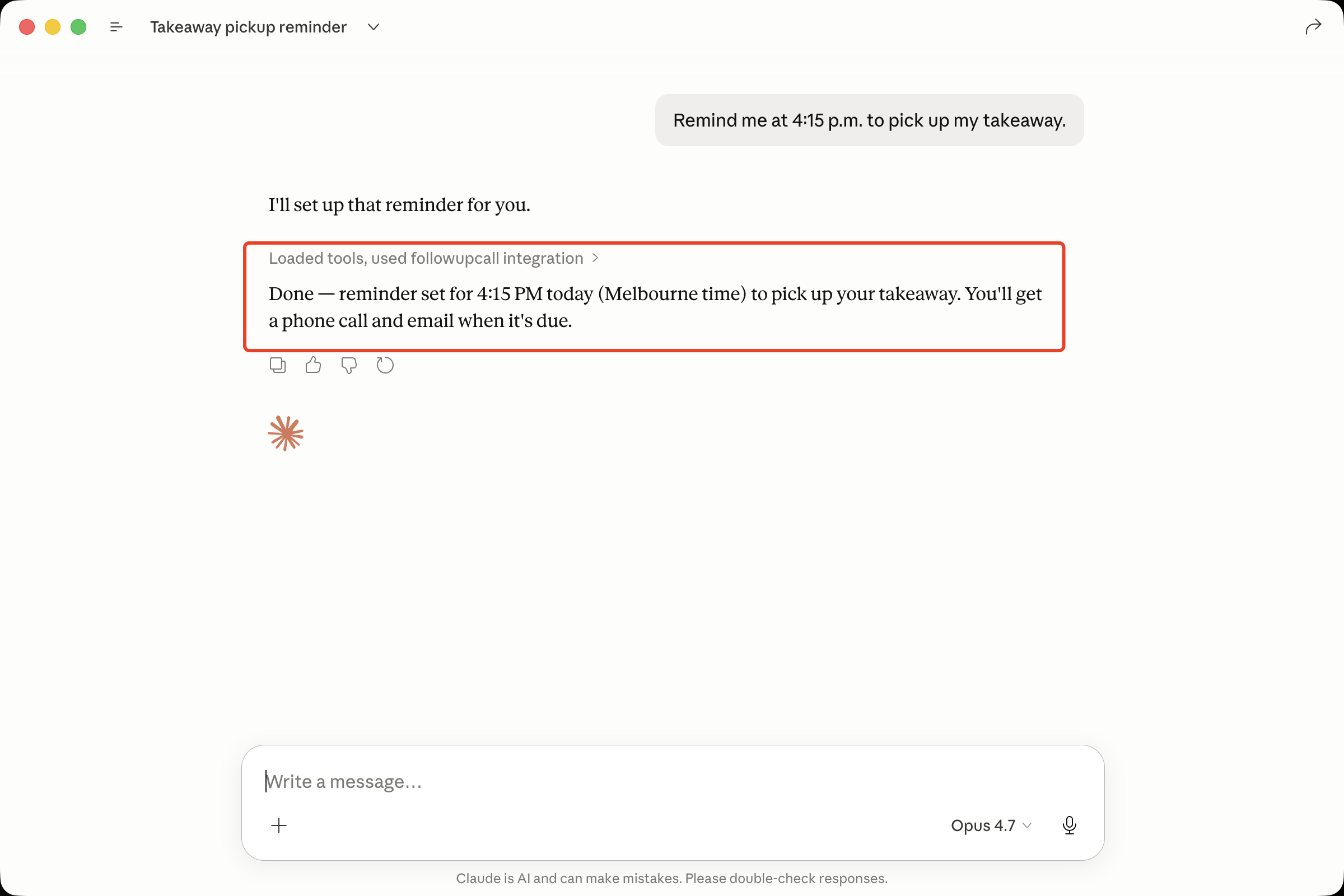
Start using it
A browser window will open for Google sign-in on first use. After that, just ask Claude in natural language:
"Remind me at 4:15 PM to pick up my takeaway"
"Set a reminder for tomorrow to review the PR"
"List my pending reminders"
Contact Card
Download the FollowUpCall contact card to add all addresses to your phone and email contacts in one tap. This makes it easy to autocomplete addresses when composing emails.